How to Make an AI Rap Video of Two People (Orange Booth Trend)
Two photos, a stage and one line of text: how the duet AI rap video trend is made, the prompt that works, the cost per second and results from five real runs.
 RapVideo
Short answer: you need a video model that takes reference photos and makes sound in the same pass, a prompt that pins each face to one side of the frame, a stage description, a request for an original song, and a topic with names in it. Seedance 2.0 Mini's reference-to-video endpoint does all of that for $0.06 a second at 480p. Each of our five test clips took between two and a half and three and a quarter minutes, and every one came back as a short rap about the topic, in the language the prompt asked for, with both faces kept from the photos.
The trend you have seen on TikTok and Reels (two friends rapping in a plain orange studio, a single microphone hanging between them) is not filmed. It is generated from two photos. Below is how it works, step by step, with the numbers from our own runs on November 12, 2026.
What you need
| Piece | Why it matters |
|---|---|
| Two photos (or one photo of both people) | The model keeps the faces it is given. One clear, front-facing face per photo works best. |
| A reference-to-video model with native audio | The song, the voices and the lip movement come from the same generation, so they line up. |
| A prompt that assigns sides | Without it, models swap people or blend two faces into one. |
| A topic with names and one detail | "Maya's 25th birthday, always late" gives the lyrics something to say. "A rap" does not. |
The model we use is ByteDance Seedance 2.0, called through WaveSpeed's reference-to-video endpoint. Your photos go in as reference_images, and the prompt calls them @Image 1 and @Image 2. There are four tiers: Mini, Fast, 2.0 and 2.5. Each has a standard endpoint and a cheaper, faster Turbo one; Turbo has no 480p.
Step 1: pick the photos
Upload order decides who stands where: in our template, photo 1 is the left performer and photo 2 the right one. Selfies that stop at the shoulders work, because the prompt tells the model to complete the outfit to match what it can see. What fails is anything that hides the face: sunglasses, a hand over the mouth, a face that fills a tenth of the frame.
With one photo of both people, the prompt has to point inside the picture ("the person on the left in @Image 1"). In our street test with a single photo of two friends, the model kept each of them on the side they stood on in the photo.
Only use photos of people who agreed to it. That is the first line of every responsible tool's terms, ours included, and it is the part of this trend most likely to get someone hurt.
Step 2: describe the stage
The stage is two short descriptions: the set and the music. These are the four we tested:
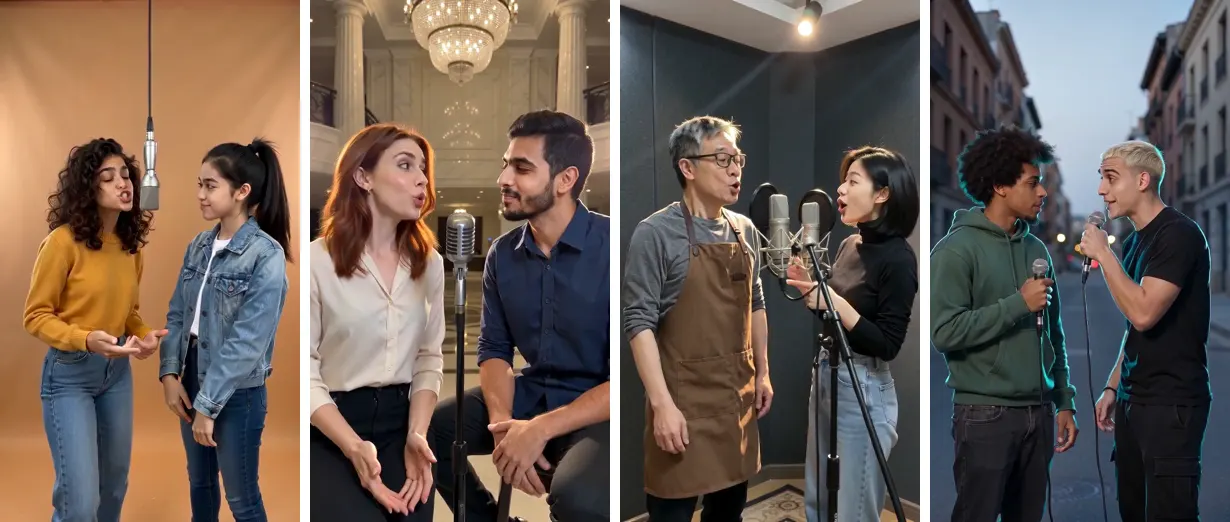
| Stage | Set | Music |
|---|---|---|
| Orange booth | Seamless orange studio, soft frontal light, one silver mic hanging between them | Dark trap: sliding 808, clap-snare, eerie loop |
| Luxury lobby | Marble hotel lobby at night, crystal chandelier, warm gold light | Luxury trap: deep 808, soft piano |
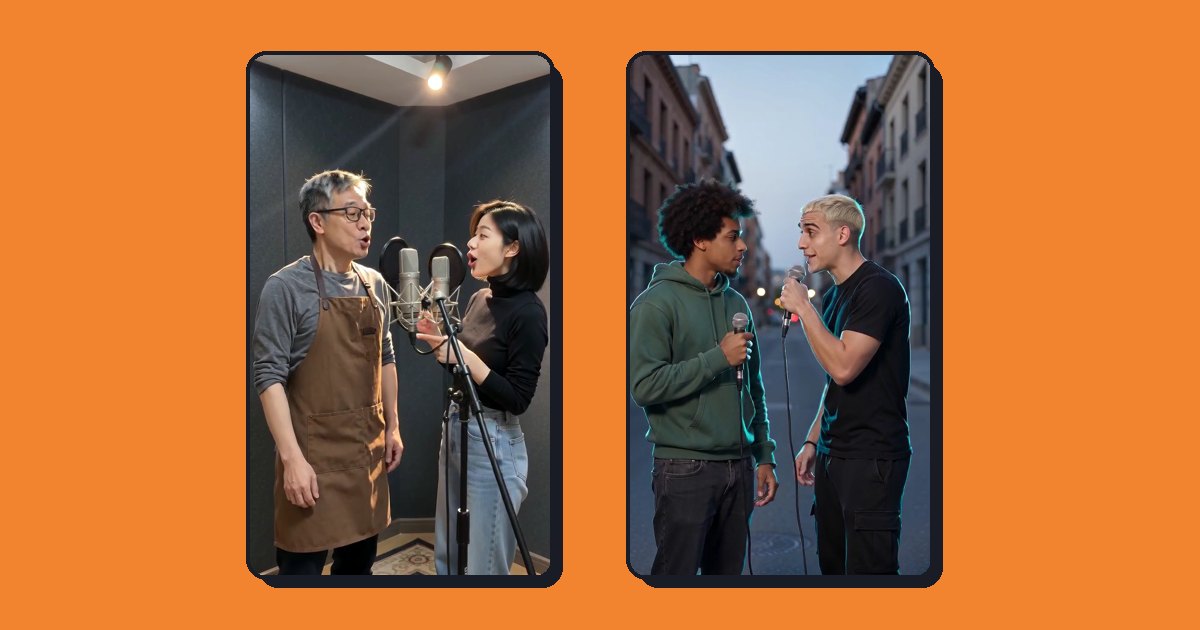
| Recording booth | Acoustic foam walls, tungsten light, a mic with pop filter for each | Boom-bap: dusty drums, warm bass |
| Street | Brick street at dusk, cyan rim light, a handheld mic each | Street hip-hop: hard drums, vinyl crackle |
Two details mattered more than we expected. Frame both performers from the knees up with faces large, or the lip sync is too small to read. And if two people take turns, give each of them a microphone, or state who holds the one between them.
Step 3: write the prompt (or let a template do it)
The prompt we send has the same seven parts every time. In order:
- Shot: "12 seconds, one locked-off shot, no zoom, no pan, no cuts." Video models love to cut to a new angle; a duet looks wrong when they do.
- Identity: who is left, who is right, keep each face, never blend or swap them.
- Set: the stage description, plus the knees-up framing.
- Soundtrack: the music description, and "the song ends on a clear final beat at 12 seconds", so the verse doesn't stop mid-word.
- Performance: either "they trade lines, left first" or "the left one raps, the right one hypes".
- Lyrics: "an original, clean rap of exactly four short lines about: (topic). Use the names. Perform in (language)."
- Limits: "no existing song, no existing lyrics, no real artist's voice, no subtitles, no extra people."
Two rules we learned the hard way:
- Say the language outright. Our first Spanish test ("Alex contra Jordan: quién cocina mejor") came back in English, because our language detector missed it and the prompt said English. After the fix, the same topic came back as a Spanish rap that ended on "¿quién cocina mejor?". Mandarin worked on the first try.
- Match the number of lines to the length. Four short lines fit 10 to 15 seconds; at 5 or 8 seconds, ask for two. Our 8-second street clip got more lines than it asked for, but it still ended on the beat.
The aspect ratio goes in the API's aspect_ratio field, not in the prompt, so the two can't contradict each other. For this trend that is 9:16.
Step 4: render and check
These are our five runs, each a single take:
| Test | Topic language | Length | Render time | Cost |
|---|---|---|---|---|
| Orange booth, birthday | English | 10 s | 165 s | $0.60 |
| Luxury lobby, couple | English | 10 s | 183 s | $0.60 |
| Recording booth, café owners, one raps | Mandarin | 10 s | 189 s | $0.60 |
| Street, rivalry, one photo of both (first try) | Spanish topic, sung in English | 8 s | 193 s | $0.48 |
| Street, same, after the language fix | Spanish | 8 s | 149 s | $0.48 |
All five used Seedance 2.0 Mini at 480p, 9:16, standard endpoint. None was refused, none failed, and in all five the performers stayed on the side their photo put them. We checked the lyrics by running each soundtrack through a speech-to-text model. The birthday clip opened with "Maya's 25th, we turnin' up"; the couple clip with "They call me Mia, been with him five years".
What to look for in your own result: the faces in the last second (drift shows up late), whether the two voices differ (ask for voices that match each performer's apparent age and gender), and whether the last line lands on the final beat.
What it costs
Without reference clips, WaveSpeed bills only the seconds of video you ask for. Reference photos are free. List prices per second on November 12, 2026:
| Tier | 480p | 720p | 1080p | Turbo 720p | Turbo 1080p |
|---|---|---|---|---|---|
| Seedance 2.0 Mini | $0.06 | $0.12 | $0.30 | $0.08 | $0.10 |
| Seedance 2.0 Fast | $0.10 | $0.20 | $0.50 | $0.12 | $0.14 |
| Seedance 2.0 | $0.12 | $0.24 | $0.60 | $0.14 | $0.16 |
| Seedance 2.5 | $0.18 | $0.36 | $0.90 | $0.20 | $0.22 |
Source: the Seedance 2.0 Mini reference-to-video page and its sibling pages on WaveSpeed. A 12-second 720p Mini clip is $1.44 at list price; a 12-second 480p one is $0.72. Note that at 720p the Turbo endpoint is cheaper than the standard one.
Can you make one for free?
Not with this model, as far as we found. Every platform that sells Seedance bills per second. Some apps offer a free first try, usually at low resolution or with a watermark. RapVideo does not give a free video: new accounts get a few credits to look around, and a clip starts at 60 credits (5 seconds at 480p). Failed or refused videos are refunded automatically.
The quick way
If you'd rather not write the prompt, RapVideo runs this whole template for you. Add two photos, pick one of the four stages, type the topic and press the button. The page shows the exact credits before you start. For a specific occasion there are presets: a birthday rap, a rap battle and a couple rap.
Limits worth knowing
- Likeness, not a copy. Faces stay recognisable, but they are generated. Expect "that's clearly her" rather than a photograph.
- Lip sync is good, not perfect. On fast lines the mouth sometimes rounds off syllables. Shorter lines help.
- The song is original, but it is AI music. No existing track is used, which is why the video isn't built on a song a platform would mute. Whether every platform's detector agrees is not something we can promise.
- Trend names belong to their owners. The orange booth look is a trend, not a product. We are not affiliated with any artist, song or show it is compared to.
FAQ
How do I make an AI rap video of two people? Use a reference-to-video model with native audio, give it one photo per person, and write a prompt that assigns each photo a side, describes a stage, asks for an original rap about your topic and names the language.
What is the orange background AI rap video? It is the same setup on a plain orange studio set with one hanging microphone. Ask for a seamless orange studio, soft frontal light and one silver microphone between the two performers.
Which AI makes rap videos with lip sync? We use ByteDance Seedance 2.0 through WaveSpeed. Its reference-to-video endpoint takes the photos and generates picture, voices and music together, so the lips follow the words.
How long does an AI rap video take? Between 149 and 193 seconds in our five runs at 480p. Higher tiers and resolutions take longer.
Can the rap be in Spanish or Chinese? Yes, if the prompt says so. Write the topic in that language and state the language in the prompt; our Mandarin and Spanish tests both came back in the right language.